🎯 Try Live Demo Demo What it does How it works Security Pricing Install FAQ Contact AI Assistant Opportunity & Lead Scoring Email Drafting OpenAI Integration Secure Salesforce AI Setup Guide Blog
⚡ Salesforce Partner · Built for Salesforce teams

AI inside Salesforce.
No tabs. No copy-paste.

Cloud Connected AI Engine is a managed Salesforce package that brings OpenAI, Claude and Azure AI to every record — for analysis, emails, scoring and tasks.

Salesforce Partner AppExchange listing in progress Your data stays in Salesforce
Read more about the demo

No new tool. It's just Salesforce.

AI Engine lives inside Salesforce — same login, same permissions, same data. Your reps don't switch tabs. They ask questions, get answers, generate PDFs, and act on the same screen they already work on.

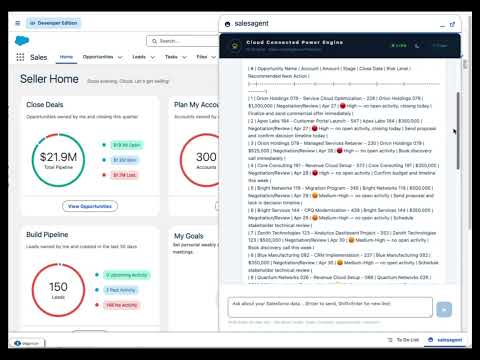
AI Engine running inside Salesforce — Show me opportunities at risk in my pipeline
🎯 SEE IT FOR YOURSELF

A real Salesforce org. 15 minutes.
No signup required.

Pre-loaded with realistic B2B sales data. Try the AI assistant, generate emails, score opportunities and explore AI Engine on real records — directly inside Salesforce.

Try Live Demo → no email required

Everything AI Engine does inside Salesforce

Practical AI features for sales teams — from meeting prep and record analysis to scoring, email drafting and pipeline insights. All inside Salesforce, no copy-pasting, no new tools.

📅

Meeting Prep 1-Pager

One click on any Account or Opportunity generates a complete meeting brief — company news, opportunity history, recent activity, talking points and a printable PDF. From 20 minutes of prep to 30 seconds.

Learn more
🎯

AI Lead & Opportunity Scoring

Every Lead and Opportunity gets an AI score 0–100, based on your historical won/lost patterns, data completeness and engagement signals. Replaces Einstein Lead Scoring at a fraction of the cost.

Learn more
🤖

AI Salesforce Assistant Chat

Ask questions about your Salesforce data in natural language. "How many leads closed this month?" — instant SOQL-powered answers, respecting sharing rules and FLS.

Learn more
📋

Record Summary

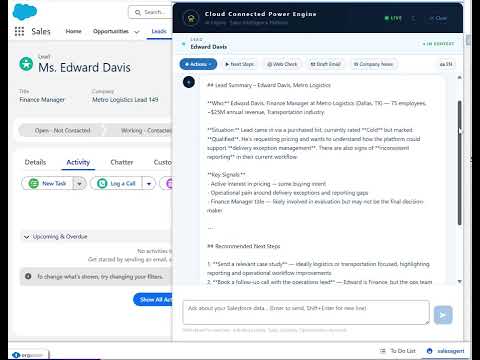
One click to get a full AI analysis of any Lead, Account, Opportunity or custom object — highlights, risks, fit signals, missing info, next steps.

Learn more
✉️

Email Drafting

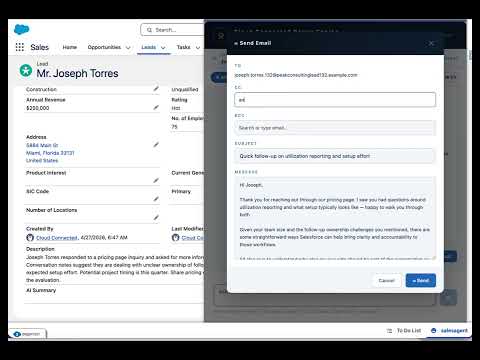
Generate personalized outreach emails tailored to the record context. Edit and send directly from Salesforce with the built-in email composer.

Learn more

Next Steps Generator

AI proposes 5–8 concrete, prioritized action items per record. Convert them to Salesforce Tasks with one click — due dates and priorities included.

Learn more
🌐

Web Intelligence

Instantly research any company or contact from within Salesforce. Fresh news, LinkedIn signals, funding rounds, company insights — no leaving the CRM.

Learn more
⚙️

Custom Prompt Templates

Build your own AI actions tailored to your sales process. Visit reports, qualification scoring, competitor analysis — anything your team needs, reusable across the org.

Learn more
📄

PDF Report Generation

Export AI analyses, meeting briefs and record insights as formatted PDFs. Custom branding supported. Save to Salesforce Files or email directly.

Learn more
🔌

Multi-Provider Support

Switch between OpenAI, Claude and Azure AI. Use your own API keys — you control costs, provider choice, and data residency.

Learn more
📌

Utility Bar Integration

AI Engine lives in the Salesforce Utility Bar — always accessible, context-aware, available on any record page without navigation.

Learn more
📈

Activity Monitor

Admin dashboard showing who uses AI, how often, tokens consumed, estimated cost — per user, per feature, per day. Full visibility on AI adoption and spend.

Learn more
🔐

License & Access Control

Granular user management with Salesforce Permission Sets. Trial mode, seat-based licensing, easy admin controls. Restrict features by profile, role or department.

Learn more

AI Engine inside Salesforce

Watch how AI Engine integrates into your Salesforce workflow — from record analysis and email drafting to pipeline insights and admin configuration.

Or skip the video — try the live demo yourself →

Record Analysis & AI Summary

See how AI Engine analyzes any Salesforce record — generating highlights, risks, fit signals and next steps in one click.

AI Assistant Chat & Email Drafting

Ask questions about your CRM data in natural language and draft outreach emails — directly from the Salesforce Utility Bar.

Object & Field Configuration

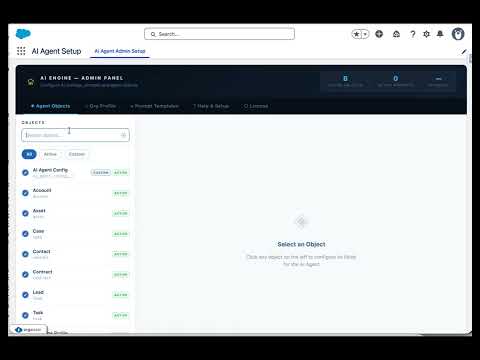
Admins choose which Salesforce objects and fields AI Engine can use. Users get helpful insights directly from the record page.

Pipeline Prioritization & Export

Identify the most important opportunities in your Salesforce pipeline. Prioritize by value, stage, close date. Export to CSV or Excel.

Reusable AI Prompt Templates

Admins define approved prompts and structured output rules; users get clean visual AI analysis directly from the record page.

AI Settings & Company Playbook

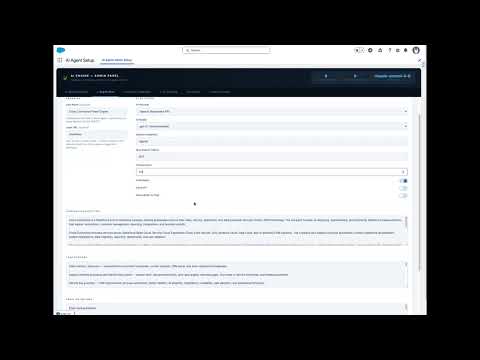
Configure AI provider, model, Named Credential, response behavior, company playbook, email guidelines — all from one admin panel.

Click any tile to watch — or try the live demo →

Up and running in minutes

No developers needed. No complex setup. Just install and configure.

1

Install package

One-click managed package install on Production or Sandbox. No code required.

2

Connect AI

Add your OpenAI, Claude or Azure AI API key via Salesforce Named Credentials.

3

Use AI everywhere

Assign Permission Sets and start using AI on every record — analysis, emails, scoring, tasks.

Clear data access. No surprises.

AI Engine is designed for Salesforce admins and business teams that need clear rules around data access, permissions, AI providers and logging.

🔒

Salesforce security respected

Users only see records and fields they can already access in Salesforce. Sharing rules, role hierarchy and Field Level Security still apply.

🛡️

Admin-controlled AI context

Admins decide which objects and fields AI Engine can use. PII is off by default and can only be enabled intentionally by an admin.

🔑

Secure provider connections

OpenAI, Claude and Azure AI connections use Salesforce Named Credentials. API keys are stored securely by Salesforce and not exposed in code.

Security and legal documents available: review exactly what the agent can do, what data may leave Salesforce, what is logged, what the agent will never do, and the product Terms of Service.

Simple, transparent pricing

Flexible per-user pricing with volume discounts. The more Salesforce users you add, the lower the price per user. All plans include full feature access.

💳 Volume pricing — lower price per user as your team grows
💡
You pay Cloud Connected for AI Engine only. AI API costs (OpenAI / Claude / Azure) go directly to your provider — you keep full control over costs, full visibility on spend, and your existing budget arrangements. Typical AI usage runs $5–15 per user per month, billed by the provider. → Total cost is fully predictable and lower than Einstein GPT bundled pricing.

Starter

1–10 Salesforce users

$29
per user / month
vs Einstein GPT from $50/user

Best for small teams

Start 5-day Trial or book a demo

Growth

26–50 Salesforce users

$23
per user / month
vs Einstein GPT from $50/user

Best for RevOps teams

Start 5-day Trial or book a demo

Enterprise

51+ Salesforce users

Custom
volume pricing
vs Einstein Enterprise $100+/user

Best for larger rollouts

Book a Demo
🎯

Support included in every plan

Every subscription includes dedicated support for the full duration of your contract — email, chat, and onboarding assistance. No extra fees, no tiers.

* Pricing is per Salesforce user, with volume discounts as your team grows. AI API costs (OpenAI/Claude/Azure) are separate and billed directly by the provider. All plans include full feature access, support, and onboarding assistance.
Need a different setup? We can prepare a custom quote for any number of users and any contract length — monthly, yearly, or custom term. Contact us.

🎁 5-Day Free Trial — No commitment required

Try AI Engine — completely free

Install in 1 click. Full access for 5 days. No credit card, no contract, no obligation.

100% free for 5 days All features unlocked Up to 3 users No credit card required Cancel anytime

📋 Just installed? Follow the setup guide

Step-by-step checklist to get AI Engine running in 30 minutes

Open Setup Guide →

Frequently asked questions

Let's talk about your needs

Book a demo, ask a question, or request a custom quote. We respond within 24 hours.

Cloud Connected

We help B2B companies supercharge their Salesforce with AI. Based in Miami, serving clients across US and Europe.

Email: contact@cloudconnected.pl
LinkedIn: cloud-connected
📅 Book a Demo
Thank you! We'll be in touch within 24 hours.
📊

Title

Subtitle

Description